goelweb.com --> Software --> Secure Web Browsing with DD-WRT/OpenWRT, Dynamic DNS, SSH, and Firefox
This tutorial will allow secure web browser via an SSH tunnel. The basic idea is to send all your web browsing through a secure SSH tunnel.
| your computer |
<-- | secure connection |
--> | SSH server (outside work/ public hotspot) |
<-- | unsecure connection |
--> | Web |
The following steps are required if you want to run your own SSH server. Instructions for setting up an ssh server on Ubuntu Linux can be found here.
I use a Buffalo WHR-G125 router (approx. $40) flashed with the DD-WRT firmware. This firmware is Linux-based with a built-in SSH server. OpenWRT is another Linux-based router software with a similar feature set. If you're in the market for a router, I strongly recommend purchasing a router compatible with a Linux-based firmware. It is also possible to install an SSH server on your home computer (including Windows). If anyone has any free recommendations, please let me know.
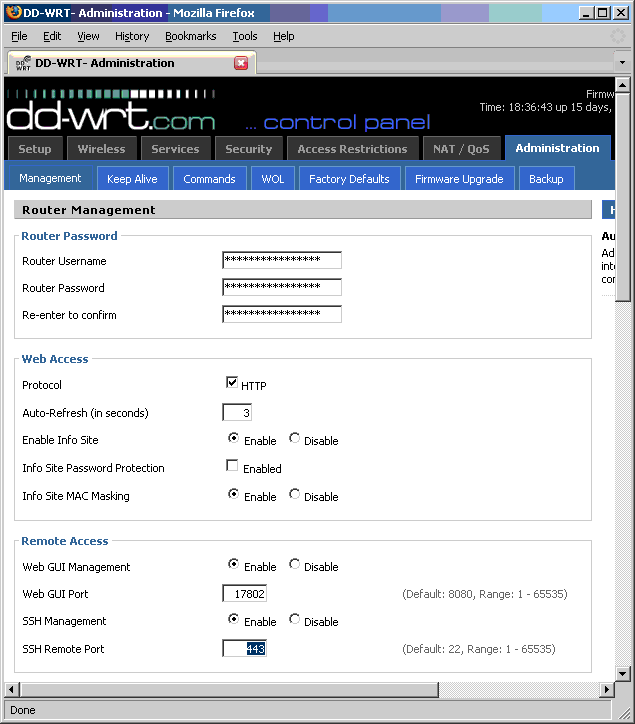
I've enable my SSH server on port 443. This is the same port used for https:// connections, so it may not be closely monitored (and if you're connecting from work, it may be a port opened on the firewall). All your data transfer is secure, all that can be measured is the volume of the traffic, not the contents.
Most ISPs (Internet Service Provides) do not provide a static IP address to their residential customers. How can you connect to your SSH server if you can't reliably track its IP address? To always keep track of your IP address, you want to associate a hostname/URL to your IP address. This is achieved with dynamic DNS. Whenever your IP address changes, the dynamic DNS client will automatically update your URL with your current IP address. Getting the URL is FREE. I use No-IP.com. You can select a URLs from a number of different options such as whatever-name-you-want.hopto.org or whatever-name-you-want.no-ip.com. Since most routers come in with a built-in dynamic DNS update client, you may not need to use the update client provided by your dynamic DNS service (unless, of course, you don't use a router).
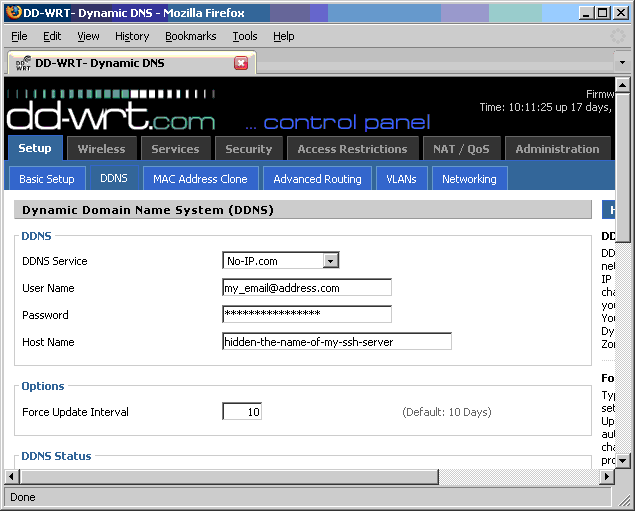
The best SSH client available for Windows is PuTTY. I've hidden the name of my SSH server for security purposes in the details below.
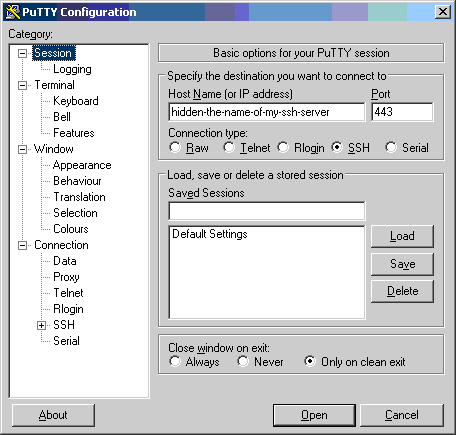
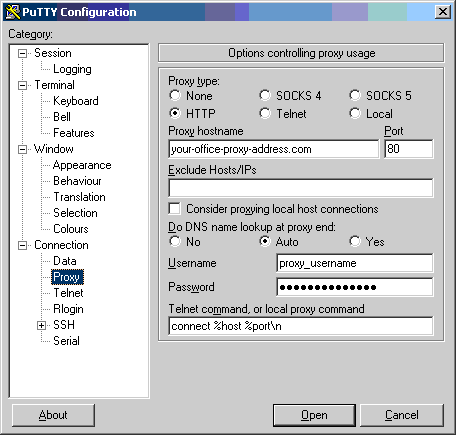
Source port: enter 80 (or any other port number)Destination: leave blankDynamicAutoAdd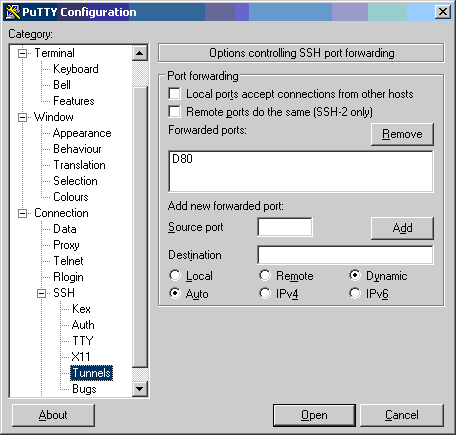
Saved Sessions: enter name for the sessionSave
Note: The first time you connect to the SSH server, you may be asked to add the server's fingerprint to list of known hosts.
After you login to your SSH server, view the PuTTY Event Log. You should notice a line similar to Local port 80 SOCKS dynamic forwarding. You've successfully set up a local SOCKS 5 proxy on local port 80 (or whatever port you set up on the Tunnel panel).
2008-01-22 15:00:51     Looking up host "hidden-the-name-of-my-ssh-server"
2008-01-22 15:00:51     Connecting to 10.150.170.193 port 80
2008-01-22 15:01:20     Server version: SSH-2.0-dropbear_0.49
2008-01-22 15:01:20     We claim version: SSH-2.0-PuTTY_Release_0.60
2008-01-22 15:01:20     Using SSH protocol version 2
2008-01-22 15:01:21     Using Diffie-Hellman with standard group "group1"
2008-01-22 15:01:21     Doing Diffie-Hellman key exchange with hash SHA-1
2008-01-22 15:01:21     Host key fingerprint is:
2008-01-22 15:01:21     ssh-rsa 1040 77:10:f2:20:31:41:fd:34:a8:7a:84:98:e2:bf:47:70
2008-01-22 15:01:21     Initialised AES-256 CBC client->server encryption
2008-01-22 15:01:21     Initialised HMAC-SHA1 client->server MAC algorithm
2008-01-22 15:01:21     Initialised zlib (RFC1950) compression
2008-01-22 15:01:21     Initialised AES-256 CBC server->client encryption
2008-01-22 15:01:21     Initialised HMAC-SHA1 server->client MAC algorithm
2008-01-22 15:01:21     Initialised zlib (RFC1950) decompression
2008-01-22 15:01:27     Sent password
2008-01-22 15:01:27     Access granted
2008-01-22 15:01:27     Opened channel for session
2008-01-22 15:01:27     Local port 80 SOCKS dynamic forwarding
2008-01-22 15:01:27     Allocated pty (ospeed 38400bps, ispeed 38400bps)
2008-01-22 15:01:27     Started a shell/command
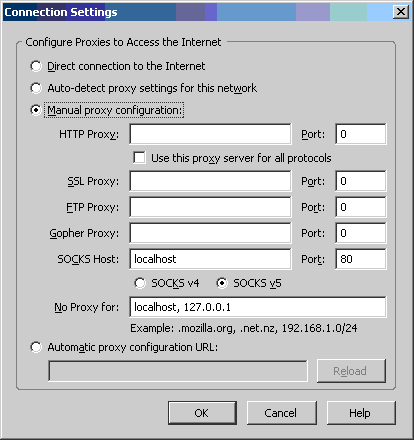
Go to Tools --> Options --> Advanced tab --> Network tab --> Settings.
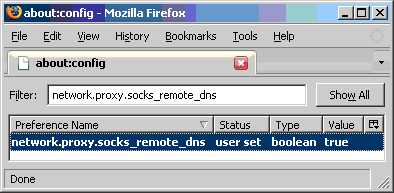
Go to address about:config. Update preference network.proxy.socks_remote_dns to true. This preference controls whether DNS lookups for SOCKS v5 clients happen on the client or on the proxy server.
As long as your SSH connection is alive, any website you visit via Firefox is secure from the office side. You can verify your connection is forwarded through your SSH tunnel by monitoring the PuTTY Event log.
2008-01-22 15:01:44     Opening forwarded connection to goelweb.com:80
2008-01-22 15:01:45     Forwarded port closed
2008-01-22 15:01:45     Opening forwarded connection to www.goelweb.com:80
2008-01-22 15:01:46     Opening forwarded connection to www.goelweb.com:80
Your web browsing speed is limited to the UPLOAD bandwidth provided by your ISP.
Just wanted to let you know that I was able to successfully set up my own SSH tunnel based on your instructions -- thanks for writing that tutorial, it helped me out a lot!
As such, I thought I would contribute a bit if you're interested -- you had asked if anybody had a free recommendation for setting up an SSH server. My router doesn't support this, so I used Open SSH on my Linux box. You can run Open SSH on pretty much any Linux/Unix box, but I specifically used Ubuntu Linux, version 6.10 (Edgy Eft). Here is what I did:
sudo apt-get install sshThis will also start the ssh server, but on the default port of 22. To change this, do the following:
gksu gedit /etc/ssh/sshd_config
# What ports, IPs and protocols we listen for
Port 22
sudo /etc/init.d/ssh restart
sudo apt-get install no-ip
sudo no-ip -COnce you answer the questions contained in the configuration utility, a file called no-ip.conf gets created, by default under /etc.
sudo /etc/init.d/no-ip start
That's it. Thanks again for your help, talk to you later.
rishi.goel@alumni.usc.edu