goelweb.com --> Software --> Torrent Downloading with uTorrent on WinXP
This tutorial will teach you the PROPER way to maximize your torrent downloads. This is how I've configured uTorrent on my Windows XP machine. I don't know the configuration for Windows Vista.
Windows XP limits the number of concurrent TCP/IP connections to ten. Since torrents can connect to potential thousands of different peers, a limit of ten is too low. On my computer I've increased the number of concurrent connections to 1024.
Make sure that no other process is utilizing your Internet connection.
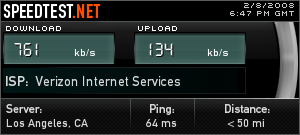
My speeds are 761 kilobits/s (kb/s) download and 134 kilobits/s (kb/s) upload.
uTorrent displays download/upload speed in kilobytes/s (kB/s). We need to divide our numbers above by eight (8 bits = 1 byte) to get out maximum download/upload speeds in kilobytes/s.
Thus my speeds now become 95 kB/s download and 17 kB/s upload. These are maximum speeds. Since you are also sharing parts your torrents to other peers (uploading), your download speed is lowered correspondingly. In practice, you can never download a torrent at your maximum download speed.
To put it simply, this is the best torrent client available.
I limit my global upload bandwith to 6 kB/s. I've noticed that if I set it to anything lower, uTorrent automatically limits my download bandwidth to 30 kB/s or lower.
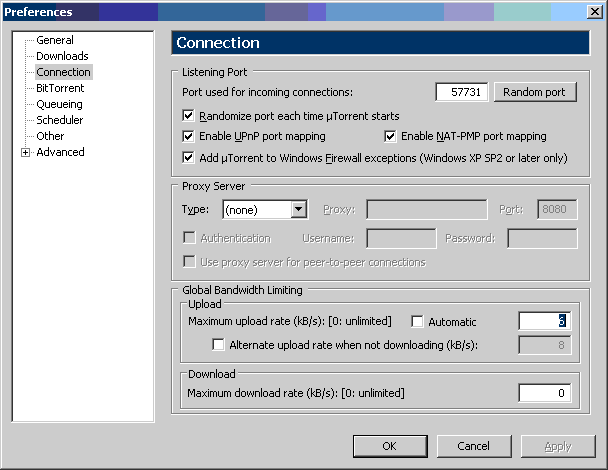
When global upload bandwidth set to 6 kB/s.
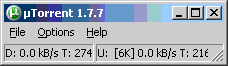
When global upload bandwidth set to 5 kB/s. Note that download is limited 30kB/s. See D: [30K] in the status bar.

Setting the upload parameter to anything higher causes your download speeds to eat up too much of the available bandwidth. Allowing uTorrent to decide also causes a significant portion of your bandwith to be dedicated to uploading.
For my bandwidth, I've found my maximum download speed hovers around 83 kB/s. Remember that is includes an upload speed of 6 kB/s. It may take a few minutes after you begin downloading a torrent hit your maximum download speeed.
rishi.goel@alumni.usc.edu